public 3d-motion repository
ultimate-frontend-skills
// ridelink0/ultimate-frontend-skills
Claude Code and Codex frontend skills for cinematic websites: art direction, WebGL, parallax, three.js, audit.
Ultimate Frontend Skills
This is also the canonical source repository for Usage Limits and standalone image deep research. The marketplace keeps them independently selectable; UFS already includes image research. See suite installation and qualification for source locations, package contents, licenses and release checks.
UFS for Claude. Build, measure, debug and secure cinematic websites from Claude Code or Codex. Plugin id ultimate-frontend-skills; the old ultimate-website-skills and cinematic-web-design install names redirect on GitHub but the skill and commands now live under the new id.
A pinned art direction for websites, plus the code that produces it.
Release hardening and workflow skills
UFS now includes terminal-ui, sound-design, claude-dashboards,
claude-motion, ui-pro-max, remotion-video, deep-research and link-preview.
Their source examples cover terminal output, opt-in synthesized audio, a mock
workflow table/dialog and per-page social cards. Existing product identity and
real workflow behavior take precedence over house defaults.
node scripts/terminal-ui.mjs
node scripts/scene-budget.mjs measurements.json
node scripts/link-preview.mjs dist https://example.com/
node scripts/link-preview.mjs dist https://example.com/ --check
npm run check:distribution
The distribution is readable source, with no install lifecycle download. The gate checks the explicit package payload; local checks do not certify the directory portal or a live deployment. All 454 reference records are retained in bounded JSON parts with a small awards manifest. Offline packs and privacy documentation now ship in the npm payload.
Ten additional source integrations are downloaded and pinned in
integrations-2026-11-01.json:
UI UX Pro Max, Anthropic webapp testing, Expo, Trail of Bits static analysis,
Remotion, Supabase, Vue, Anthony Fu's Vite/Vitest skills, Seth Hobson's frontend
plugin, and Google Stitch skills. Each entry records its source commit, license,
domain and qualification. These are ten source-qualified integrations; their
upstream clean builds and native host operations have not all been run.
Use node scripts/webdesign.mjs packs --dry-run --only <id> to inspect a chosen
install. Skill installs select the named skills, rather than every skill in a
repository. No pack is installed during UFS installation, no overlapping plugin
is silently disabled, and no tool permission is auto-approved.
Remotion has its own runtime licensing; its inspected skill snapshot has no root license, so it is linked rather than vendored. Claude Dashboards and Claude Motion are first-party artifact products, distinct from community libraries. Their skills check access and do not duplicate Claude Design setup.
Coding agents converge on the same page: Inter everywhere, an indigo-to-pink gradient, three feature cards with icon circles, everything centred, 16px radius on everything, and copy about unleashing your potential. It is recognisable enough that people have built scanners for it.
ultimate-frontend-skills replaces that default with a different one: editorial serif typography at real optical sizes, warm-neutral and near-black grounds in OKLCH, cinematic photography with eased scrims, layered scroll parallax, and procedural or Blender-modelled three.js exploded views of a made thing taken apart.
No more SVGs. Hand-drawn vector silhouettes were how this plugin used to fake depth, and they read as exactly that. Depth now comes from real WebGL and real photography: an animated shader gradient, three parallax planes that blur and haze with distance, and three.js for anything taken apart. SVG is kept for what it is genuinely best at - line art, blueprints, icons - and nothing else.
It works in Claude Code and Codex:
claude plugin marketplace add ridelink0/ultimate-frontend-skills
claude plugin install ultimate-frontend-skills@ultimate-frontend-skills
Codex, the one-command installer and npx skills are under Install.
One route, nine stages
The thing that was missing from 4.x was not another engine, it was the order to
do it in. references/pipeline.md
is the whole build: brief, bench, references, route, assets, chassis, copy,
choreography, verify, ship - with a gate at each stage that says whether to go
on or go back.
Stage 3 is the one that costs the most to get wrong, and it is now an explicit decision rather than a habit:
| The subject is | Route | Cost |
|---|---|---|
| A photograph's worth of atmosphere | photographic, cut into planes | minutes |
| A made thing the visitor should understand | procedural 3D from the markup | hours |
| A made thing with real manufactured geometry | modelled in Blender, exported to GLB | hours, plus Blender |
| A made thing that must look expensive and never move | a rendered frame sequence | hours, heaviest payload |
| A colour field, a mood, a launch page | a WebGL field | minutes |
| An argument | type only | minutes |
Most pages should not be 3D, and the pipeline says so out loud. Reaching for stage 4 on a page that does not need it is the most expensive mistake in the document.
Three references that disagree with each other
A model builds better when it has looked at the thing it is trying to match. The plugin ships a corpus of award winners and reference sites - Awwwards Site of the Day, Site of the Month and Site of the Year, FWA, three.js and Codrops demos, Godly, Land-book, siteInspire, One Page Love and the studio sites that set the standard - each with its stack, its techniques, and the one specific craft move worth taking from it.
webdesign.mjs awards --pick object --n 3        # three that disagree
webdesign.mjs awards --pick app --n 3           # registers: object|product|place|service|argument|portfolio|3d|editorial|app|game|studio
webdesign.mjs awards "wireframe dissolve" --verbose
webdesign.mjs awards --technique "pinned horizontal" --since 2025
webdesign.mjs awards --techniques               # what it can be searched by
webdesign.mjs study --awards "scroll-scrubbed 3D" --n 3   # render them, look at the PNGs
--pick deliberately refuses to return two sites from the same studio, the same
source or the same technique. Three variations of one look teach the look; three
different answers teach the decision.
The corpus is data, not instruction. Nothing in the plugin copies a site - it
picks references so study can render them and you can look.
The corpus is checked, not just harvested:
webdesign.mjs awards --check --fix     # HEAD every URL, follow redirects, mark the dead
webdesign.mjs awards --stats
A reference site is the one thing here with a shelf life. Studios redesign and
domains lapse, and a study run against a dead URL renders a parking page and
teaches the model something wrong. Dead entries are marked unverified rather than
deleted - a site being behind bot protection is not the same as being worthless,
and that is a judgement for a person.
Blender, CC0 textures, and generated imagery
Three tools that reach outside the page, each behind the same CLI.
webdesign.mjs blender probe                                    # is it even here
webdesign.mjs blender glb scripts/blender/part-library.py --out build/watch.glb
webdesign.mjs assets search brushed                            # CC0 PBR material sets
webdesign.mjs assets textures <slug> --res 2k --out img/mat
webdesign.mjs assets hdri <slug> --res 1k --out img/env        # real environment lighting
webdesign.mjs assets gen "<prompt>" --out img/plate.png
assets gen detects what this machine can actually do - an attached
image-generation MCP server, a key in the environment, a local generator, or
nothing - and says what to do next. It never invents a key and never sends a
prompt to an endpoint it has no credential for.
The Blender path is verified end to end rather than described. Against Blender
4.5.13 LTS, part-library.py builds a dive watch as ten named objects - case,
knurled bezel, domed crystal, dial, applied indices, hands, movement, rotor,
caseback, bracelet - and exports it at 13,756 triangles, 468 KB raw and 64.3 KB
with Draco. The bezel knurl is cut geometry rather than a normal map, which is
the case that justifies Blender at all.
references/blender.md opens with a table saying when not to use any of it,
because most pages should not: exploded.js builds the same watch from an <ol>
in the markup with nothing to download and the list as its no-JS fallback. It
also records what only measuring tells you - the crystal alone is 67 per cent of
that triangle count, so it is the only part worth optimising.
Metal reads as metal because of what it reflects. RoomEnvironment costs
nothing and carries a lot of pages; an HDRI is the upgrade and it is a real
download, so the reference has the budgets. A generated image has its lighting
baked in and cannot be relit - that limit is stated once, with the three
workarounds, rather than designed around.
Inspecting a live site for reference
look measures a page for defects. inspect reads one for reference - the
Elements panel, on demand, over the same DevTools protocol:
webdesign.mjs inspect https://example.com --selector "h1,p,a" --width 1440
webdesign.mjs inspect https://example.com --json
It returns the computed type for every match of the selector (family, size, line-height, weight, tracking, variation settings, colour, box), the fonts the page actually loaded, the type scale as painted, the colours it uses most, and the resources it fetched with their sizes. Nothing is written.
Its first run corrected the plugin's own teardown of the Fable launch page: the hero title the reference estimated at "~76px" from a screenshot is 67.84px on a 74.6px line, in a 624px column at x 408. Numbers read from a browser beat numbers read from a picture, and this is how a teardown should start.
Two builds, as a test of the plugin
examples/fable-showcase and examples/houston-roofing were built by an
agent following the pipeline with no help, then verified with the plugin's own
tooling. Each carries a BUILD-NOTES.md that says what the plugin did well,
where it fell short, and what had to be hand-written - read those before the
pages; they are the honest part. Serve them locally:
webdesign.mjs serve examples/fable-showcase --port 4321
webdesign.mjs serve examples/houston-roofing --port 4322
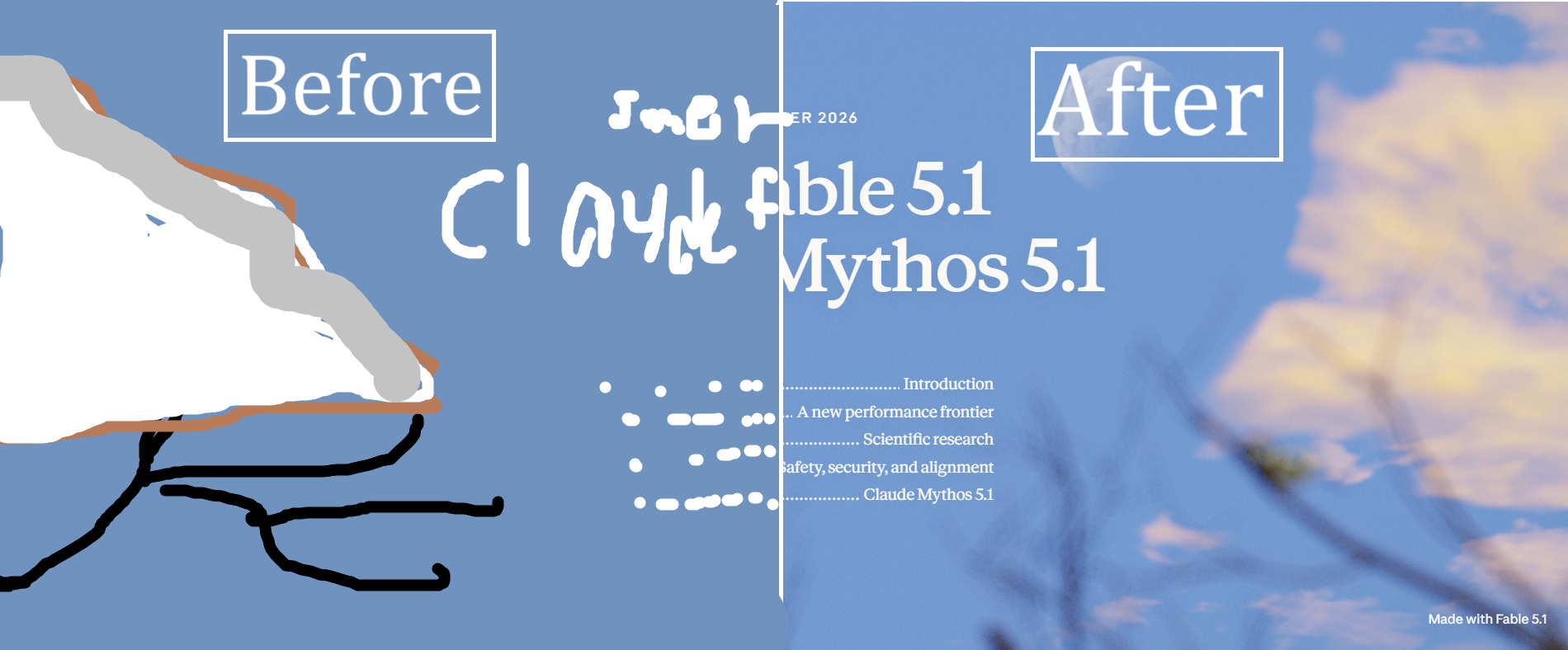
The Fable recreation is measured against the live page side by side, and the
first comparison found the engine's sky was not the reference's sky - pale
where it is saturated, wisps where it has cloud masses, a hard crescent where
the moon is large and soft, and a branch silhouette across the centre where
the original keeps one blurred branch in a corner. That is being fixed in
sky.js itself, with data-branches, data-moon and data-cloud so the
next page can tune it without editing the engine.
Real projects feed back the same way. docs/field-tests
holds a dated record for each project built with the plugin - so far Doodle
Voyager (a three.js space shooter with live multiplayer) and HQ (a key-gated
dashboard with a shader and PBR lab) - with every lesson in five parts: what
happened, what the plugin said, what it should have said, the fix, and the
test that now holds it. test/field-tests.test.mjs fails the suite if a
record names a test that does not exist.
The packs it works alongside, and how to get them
Detection was only half of it. packs lists the packs this plugin defers to,
says which are installed, and - with --install - gets the absent ones through
the tool each author documents. Nothing is copied into this repo; each pack is
its author's, installed at your scope, updated there.
webdesign.mjs packs                 # what is recommended, what is here
webdesign.mjs packs --dry-run       # the exact commands, nothing run
webdesign.mjs packs --install       # get every absent one
| Pack | Owns when installed |
|---|---|
| emilkowalski/skills | UI component motion (animate) and the verdict on it (review-animations). The line between his numbers and this plugin's is component versus page - references/skill-packs.md draws it |
| frontend-design (Anthropic, official) | Aesthetic direction at the start of new UI |
| MickeyAlton33/web-designer-plugin | Award-winning references as a way of teaching a model what good looks like - the idea this plugin's corpus grew from |
vercel-labs/agent-skills web-design-guidelines | A broad review checklist, the most-installed design skill in the ecosystem |
addyosmani/web-quality-skills accessibility | Accessibility review, from the Chrome team's side |
ibelick/ui-skills fixing-accessibility | Fixing accessibility defects, not just finding them |
| cloudai-x/threejs-skills | three.js as a general subject, everything outside the scroll-driven product page |
Credits
CREDITS.md names every site in the reference corpus and every
pack the plugin defers to - the studios, the award pages, the games, the apps
and the people behind them - so the work this plugin learns from is visible.
It is generated from the data (webdesign.mjs credits) and checked in tests,
so a site cannot enter the corpus without entering the credits.
The corpus, its licence, and what it is not
The reference corpus (skills/ultimate-frontend-skills/data/awards.json)
stores, for each site CREDITS.md names (444 at 6.1.0), its name, URL, studio,
year, award and a one-line description of the craft move worth taking from
it. It copies nothing from any site: no markup, no CSS, no image, no copy. The
sites are pointed at so study can render them and a person or a model can
look; nothing in the plugin reproduces one. An entry is removed on request
from the site's owner or studio - open an issue naming the URL. The plugin's
MIT licence covers the plugin's own files only; it grants nothing over any
site the corpus names, whose rights stay with their owners.
Built on the work of
This plugin exists because of other people's work, and it should say so where it can be seen.
- Emil Kowalski - the
animateandreview-animationsskills, MIT. Two of his rules were adopted into this plugin's own practice because it had no position on either: never enter fromscale(0), and reduced motion is a gentler variant rather than zero. - MickeyAlton33/web-designer-plugin - published first, in March 2026, the idea of naming the specific award-winning site beside each technique so a model decides against something real rather than from memory: 48 patterns from 38 sites, each attributed to where it was taken from. This plugin's corpus is that idea as structured data - 446 entries, 389 with a URL that was fetched and answered, each carrying its stack, techniques, palette, type, motion and the one craft move worth taking - so it can be queried by the problem and rendered into contact sheets. The idea was his.
- Anthropic's frontend-design - when installed it owns aesthetic direction and this plugin defers to it.
- Vercel Labs - the
skillsCLI and the open ecosystem the packs above are installed through. - Poly Haven and ambientCG -
CC0 PBR material sets and HDRI lighting with key-free APIs.
assets texturesandassets hdriare thin clients over their work. - three.js, GSAP,
Lenis, anime.js -
the runtimes
references/stack.mdpins. - Blender - the modelled-3D route runs on it headless; the Blender Foundation's glTF exporter is what carries the named parts to the web.
- rembg and
Depth Anything V2 -
local background removal behind
cut, and the depth mapsdepth.jsreads. - The showcase sites the corpus is harvested from - Awwwards, FWA, Codrops, Godly, Land-book, siteInspire, One Page Love, Httpster, Minimal Gallery, Lapa Ninja, Best Website Gallery, CSS Design Awards, the Webby Awards, and the three.js showcase - and every studio whose site is in it. The corpus points at them; it never copies them.
- Anthropic's Fable 5.1 launch page - measured from its own shipped bundles
in
references/fable.mdandreferences/fable-showcase.md, which also record what could not be evidenced about how it was made.
The rest of the bench
webdesign.mjs tools
Reports every collaborator it can find on this machine and one line on what
changes because of it. The important one: if Anthropic's frontend-design
plugin is installed it owns the aesthetic direction at the start of new UI,
and this plugin supplies the chassis, the motion, the 3D and the verification.
If it is not installed, the house style stands in. Either way the seam is
silent - the plugin never interrupts a build to tell you to install something.
It wires itself
The scaffolder emits only the engines a page actually uses, so a page with no
3D never downloads three.js, and the audit checks it both ways: an engine's
markup with no script behind it is an error, and a script nothing uses is a
warning. look now captures console errors and uncaught exceptions too, so a
failed shader compile or a missing import fails the check instead of quietly
rendering less than it should.
Install
Ultimate Frontend Skills is the plugin previously named Ultimate Website Skills (4.x) and cinematic-web-design (3.x), which in turn absorbed Atelier. Migration and aliases · The pipeline · Claude Design routes
git clone https://github.com/ridelink0/ultimate-frontend-skills
node ultimate-frontend-skills/scripts/install.mjs
That registers the plugin with both CLIs. Or do it by hand:
# Claude Code
claude plugin marketplace add ridelink0/ultimate-frontend-skills
claude plugin install ultimate-frontend-skills@ultimate-frontend-skills
# Codex - ~/.codex/config.toml
[marketplaces.ultimate-frontend-skills]
source_type = "git"
source = "https://github.com/ridelink0/ultimate-frontend-skills.git"

[plugins."ultimate-frontend-skills@ultimate-frontend-skills"]
enabled = true
Skills only, through the open skills ecosystem, into every agent it finds on the machine:
npx skills add ridelink0/ultimate-frontend-skills
That installs the skill folders (ultimate-frontend-skills, image-deep-research and the visual-research alias): the references, the CSS chassis and the motion runtime, and image deep research, which carries its own scripts. It does not install the plugin's scripts
- the scaffolder, the audit, the render check and verify. The skill then looks
for a clone to run them from, and without one it says they are not installed
rather than reporting a check it did not run. On a machine that has the plugin,
skip this route: Claude Code would load both copies of each skill, and
webdesign.mjs toolslists any copy that is loaded twice or out of date.
The same works for the sibling plugins: ridelink0/claude-code-usage-limits
and ridelink0/claude-computer-use. skills.sh has no submission step - it
lists what the CLI installs.
Gev's repositories
Every public repository under ridelink0, one line each. Each answered on GitHub on 2026-11-08 and none is archived; that is a link check, not a clean build of each one.
- ultimate-frontend-skills - this suite: UFS 6.11.0, Usage Limits 1.45.0 and image-deep-research 1.2.2 in one marketplace, with Computer Use 0.12.0 in
plugins/computer-use. - claude-code-usage-limits - where Usage Limits started; its source now lives in
plugins/usage-limitshere. - image-deep-research - upstream of the image research skill vendored in
skills/image-deep-research. - claude-computer-use - computer use for Claude Code on Windows and macOS through the accessibility tree.
- sub-atlias - an agent harness for Claude Code, Codex, Antigravity and Gemini CLI, with shared memory and guards.
- video-watch - watch video in Claude Code: ffmpeg frames, scene cuts and contact sheets a model can read.
- doodle-voyager - a neon-ink space sim in a browser tab with no build step.
- awesome-claude-plugins - fork of composio-community/awesome-claude-plugins.
- buildwithclaude - fork of davepoon/buildwithclaude.
- awesome-claude-skills - fork of ComposioHQ/awesome-claude-skills.
- awesome-claude-code-toolkit - fork of rohitg00/awesome-claude-code-toolkit.
- jqs-acc - fork of jqueryscript/awesome-claude-code.
- travisvn-acs - fork of travisvn/awesome-claude-skills.
- behisecc-acs - fork of BehiSecc/awesome-claude-skills.
Use
Ask for a website. The skill triggers on its own:
Build me a landing page for a roofing company in Houston
Or drive it directly:
/webdesign a microsite for the Old Bridge at Mostar
/webdesign audit ./my-site
Privacy
Nothing is collected and nothing reaches the author. The prompt hook reads
prompts on your machine only. Network requests happen only when a command
needs them: Poly Haven and ambientCG for textures and HDRIs, pollinations.ai
for assets gen --model pollinations (it gets the prompt you give it), the
reference sites and sites you name (rendered in a throwaway headless browser
profile), and Openverse, Wikimedia Commons, the Art Institute of Chicago and
the Met for image research. Details in PRIVACY.md.
Slash commands
Every capability you would want to start directly has its own command. In
Claude Code each one is /ultimate-frontend-skills:<name>; the bare
/<name> works too, as long as no other installed plugin uses that name.
Typing /ultimate-frontend-skills: lists every one of them. A bare word such
as /video or /audit also searches, but it searches every installed plugin,
and with many installed another plugin's command can rank above this one; a
replica of Claude Code 2.1.283's matcher over one install of about 500
commands put UFS first for /scaffold and /verify and seventh for /video
and /audit. The full name always finds it.
| Command | What it starts |
|---|---|
/ultimate-frontend-skills:image-deep-research | Image deep research: licensed reference images with every URL verified, real sites rendered into contact sheets with their palette and type measured, a moodboard, read as pictures. This one is the skill itself, bundled from image-deep-research; the old name /ultimate-frontend-skills:visual-research still works |
/ultimate-frontend-skills:webdesign | Build a website in the house style, or audit and upgrade one that exists |
/ultimate-frontend-skills:scaffold-website | Scaffold a new site from the section library, list sections, add one to a page |
/ultimate-frontend-skills:awards | Three award-winning references that disagree, rendered so you can look at them |
/ultimate-frontend-skills:inspect-website-styles | A live site's computed fonts, type scale, colours and what it fetched |
/ultimate-frontend-skills:audit-website | The source audit for the AI-generated tells, then the fixes |
/ultimate-frontend-skills:render-check-website | Screenshots in a real browser: overlap, overflow, contrast, broken images, console errors |
/ultimate-frontend-skills:debug-website | Screenshots, scrolling, interactions and 3D evidence in one HTML review |
/ultimate-frontend-skills:measure-website-performance | Frame rate, real parallax rates, scroll thrash, idle libraries, rendered type scale |
/ultimate-frontend-skills:security-check | Leaked secrets, unsafe forms, unpinned CDN scripts, headers, disclosures |
/ultimate-frontend-skills:verify-website | One verdict: audit, render and quality, security, optional design parity |
/ultimate-frontend-skills:preview-website | Serve a folder locally, or the dev loop that re-audits and re-renders on save |
/ultimate-frontend-skills:design-handoff | Create or implement a Claude Design project without losing it to the house style |
/ultimate-frontend-skills:design-parity-check | A built page against its design artboard: type sizes, palette, rhythm, geometry |
/ultimate-frontend-skills:photo-parallax-layers | One photograph cut into parallax planes, locally with rembg |
/ultimate-frontend-skills:blender-3d-model | Headless Blender: a GLB with named parts, baked maps, a turntable sequence |
/ultimate-frontend-skills:pbr-textures-hdri | CC0 PBR textures and HDRI lighting, verified, with the three.js wiring |
/ultimate-frontend-skills:generate-website-image | Image generation checked against what this machine can run, without the AI-image tells |
/ultimate-frontend-skills:video-from-references | References in, a frame-exact scene, a draft, then the MP4 |
/ultimate-frontend-skills:game-start-screen | A game's start screen, menu, HUD or site as in-world UI, checked at game widths |
/ultimate-frontend-skills:app-screen-design | An app screen, task first, with its empty, loading and error states |
/ultimate-frontend-skills:frontend-tools-bench | What is installed on this machine and what changes because of it |
/ultimate-frontend-skills:frontend-skill-packs | The skill packs UFS works with: list, install, add, vendor, remove |
/ultimate-frontend-skills:atelier | The compatibility alias for the old Atelier name |
The new commands are for you to type; Claude does not start them on its own
(disable-model-invocation), so they cost nothing in a session that does not
use them. The skills (ultimate-frontend-skills and image-deep-research) still
trigger on their own when you just ask.
In Codex the same files work. When Codex installs the plugin it turns each
command into a skill named ultimate-frontend-skills:source-command-<name>:
start one with $ultimate-frontend-skills:source-command-webdesign
(and so on) or pick it from /skills. Image deep research is a skill rather
than a command, so there it is $ultimate-frontend-skills:image-deep-research.
Codex skips any command file that uses argument placeholders such as
$ARGUMENTS or $1, or that renders past 4,000 bytes, so none of these do;
the text typed after the command arrives as the rest of the message. Codex
builds these skills at install time, so update or reinstall the plugin to
pick up new commands. Codex has no equivalent of disable-model-invocation
for a migrated command, so there their descriptions join the skills list. Codex's older custom prompts (/prompts:<name>) are
deprecated and cannot ship inside a plugin, so there are none here.
What is in it
skills/ultimate-frontend-skills/SKILL.md - the doctrine. Short, because the code carries the
design rather than the prose describing it.
skills/image-deep-research/ - image deep research: open, licensed
image collections searched with no keys and every URL verified, real sites
rendered into contact sheets with their palette and type measured, and
moodboards. It is developed and released on its own at
ridelink0/image-deep-research
and bundled here from a tagged release by scripts/sync-image-research.mjs,
which records the version, commit and a sha256 of every file in
image-deep-research.lock.json; a test fails if the bundled copy drifts from
it. With UFS installed you already have it: do not install the standalone
plugin as well, or the skill is listed twice. The old name, visual-research,
is kept as a typed alias.
assets/core.css - the chassis, copied into the project verbatim. Tokens,
reset, a fluid type scale computed to land exactly on its bounds, a 12-column
grid with breakout lines, nav, buttons, hero, dot-leader index, stats, glass
cards, frames, annotation callouts, the layered/exploded stack, spec table,
steps, accordion, form, marquee, grain, vignette, reveals, scroll progress.
assets/motion.js - dependency-free, one rAF loop for every scroll effect,
degrades to a fully visible page. .r reveals, data-px parallax, data-tilt
pointer parallax, data-count counters, data-magnetic buttons, data-split
per-word headline reveal, nav shrink, scroll progress.
assets/gradient.js - an animated WebGL mesh gradient. Layered simplex
noise with domain warping, mixed in linear space, dithered against banding,
paused off-screen, one static frame under reduced motion, CSS mesh fallback.
assets/depth.js - real three-plane parallax. A signed data-depth sets
each plane's rate against scroll AND pointer, and drives blur and haze from the
same number. Also single-photo 3D from a depth map.
assets/exploded.js - any made thing taken apart in three.js, reading its
layers from an <ol> so the semantic list is the no-JS fallback.
assets/sections.html - twenty-three section archetypes.
scripts/webdesign.mjs - the tool.
webdesign.mjs new <dir> [--preset bone|ink|cinema] [--name "X"] [--sections a,b,c]
webdesign.mjs sections                 list the library and the presets
webdesign.mjs add <id> [--to <file>]   insert one section
webdesign.mjs audit <dir>              source check: copy, semantics, the tells
webdesign.mjs look <dir|url>           RENDER it at two scroll positions: overlap, overflow, contrast, PNGs
webdesign.mjs cut <photo>              one photograph into parallax planes (rembg, local)
webdesign.mjs study --list editorial   render a batch of reference sites into contact sheets
webdesign.mjs serve <dir>              local preview
webdesign.mjs parity <dir|url> --design <canvas>.html
                                      compare a built page against its Claude Design artboards
webdesign.mjs verify <dir|url> [--design REF]
                                      one verdict: audit + render/quality + security (+ design parity)
webdesign.mjs tells <dir|url> [--json]  the rendered AI tells as a vector: cream ground, overused face,
                                      template chrome, stat banner, marquee, section order (no verdict)
webdesign.mjs video scene <dir> --refs a.jpg,b.mp4 [--seconds 12] [--size 1080x1920]
                                      a frame-exact video scene built from your references
webdesign.mjs video render <scene.html> [--draft] [--audio FILE]
                                      render it to MP4, one seeked frame at a time
references/stack.md - which library for which job, with specifiers
verified against the registry and CDN URLs that resolve. anime.js v4 gets its
own section because every tutorial online is v3.
references/ - typography, motion, imagery, composition, tells, and the
pre-ship checklist. Loaded only when needed, so they cost nothing the rest of the time.
Looking, not just reading
webdesign.mjs look is the half that matters. It drives a real headless browser
over CDP - no dependencies, using Node's built-in fetch and WebSocket - loads
the page at 1440 and 390, and reports the bugs that only exist once something is
painted: text overlapping text, content past the viewport, contrast measured
against the background actually behind an element (including oklch() and
color-mix(), which every naive checker gets wrong), elements collapsed to zero,
images that failed to load, and tap targets under 24px. It writes a PNG at each
width so the agent can look at what it built.
Contrast has two paths. Where the background resolves to a solid colour, it is
checked in the page directly. Where it does not - a background image, or a
positioned layer painting underneath, which bgOf() correctly refuses to guess
at rather than produce a false failure - the screenshot the inspector already
captured is decoded and the actual pixels under the text are sampled. The
sample is taken over the line boxes the glyphs really occupy, not the element
box, and the brightest and darkest quarter of it are discarded before anything
is measured: the box contains the type as well as the ground behind it, and
without that step white display type on a dark photograph reads as "too mixed
to judge" and is silently dropped - the exact case the sample exists for. What
is left is the ground, reported as an average and as its worst tenth, where
"worst" means least contrast against the text colour rather than simply
darkest, because light type fails where a scrim is thinnest and dark type
fails where it is deepest. A sample that still spans a hard edge in the photo
is thrown out rather than turned into a confident-sounding wrong answer: mid
grey type half on black and half on white would otherwise average out to a
1:1 failure that exists nowhere on the page. Every contrast finding says which
method produced it.
A layer covering half the composition passes every static check ever written. This is how you catch it.
The audit
webdesign.mjs audit is the part that keeps the output honest. It fails the build
on placeholder copy, emoji, missing alt, missing image dimensions, pure black
or white, undefined custom properties, absent prefers-reduced-motion handling,
duplicate ids, dead href="#" links, anchors pointing at ids that do not exist,
unlabelled form controls, more than one <h1>, skipped heading levels, and
data-px without motion.js. It warns on Instrument Serif, Playfair Display,
a missing grain layer, no negative letter-spacing, and no display line-height
under 1.
Zero Node dependencies. Node 22+. cut needs Python with rembg[cpu].
Why it looks the way it does
Three reference sites, reverse-engineered: a product launch page with a photographic hero and a dot-leader contents block; a watch brand alternating bone and near-black with a blueprint section and an exploded view; a city microsite with a giant wordmark parallaxing behind a bridge. The common language is one serif family carrying the page, tiny letterspaced labels, enormous negative space, a single accent taken from the photography, and depth built from layers rather than effects.
The specific numbers - line-height: 0.92 on the hero, -0.030em tracking,
max-width: 16ch, grain at 0.055 multiply on bone and 0.13 overlay on ink, the
ten-stop eased scrim - are in the reference files with their reasoning.
MIT.
Website debugger
Run node scripts/webdesign.mjs debug --out review to capture desktop/mobile, scrolling, interactions and reduced motion in an HTML gallery. Claude and Codex must open the PNGs before reporting a visual pass. See visual debugging for action files and reference-video extraction.
Measuring the page while it runs
A still frame of a dead animation and a still frame of a live one are the same picture. So looking at screenshots, which is the other half of this, cannot answer the questions that actually decide whether a cinematic page is any good.
node scripts/webdesign.mjs quality <site-directory-or-url>
node scripts/webdesign.mjs debug <dir> --measure     # folded into the debug pass
It measures four things against named budgets, in a real browser, on the running page:
- Does it move. Frame timing over two seconds, and whether each canvas actually changes across them - a canvas can repaint sixty times a second and paint the same thing every time. Reduced motion is measured as a separate pass, because a page that keeps animating when the user asked it not to is a defect and it is invisible in a screenshot.
- Is the depth real. Parallax as a measured rate per plane: 1.00 is page
speed, under it lags, over it leads. A correct three-plane hero reads
something like
1.03 / 0.82 / 0.62. Three planes that all read 1.00 are a flat page with extra markup, and only planes that actually declare a depth are held to it. - What it cost. Bytes and requests, long tasks, layout shift - and what was loaded and never called. That last one is the expensive kind of dead code, because it sits in the critical path. It catches three.js loaded behind an import map, where checking for a global never would.
- Does it read. Distinct type sizes (a scale has a handful of steps; twenty is twenty decisions nobody made together), the largest size, the body measure in characters, and how many text colours are in play.
  ok    3 planes at 1.03 / 0.82 / 0.62 (1.00 is page speed)
  ok    1 canvas is animating
  warn  longest main-thread task 216 ms
           the page cannot respond during it
  warn  10 distinct type sizes
           a scale has a handful of steps: 80, 46, 29, 21, 20, 17, 16, 15, 14, 13
The budgets live in one place, BUDGETS in scripts/measure.mjs, stated as
numbers so they can be argued with. A report that says "feels slow" cannot be
checked; one that says "38 fps against a budget of 55" can.
Two honest notes. Headless Chrome is not locked to a display, so a frame-rate figure is a ceiling rather than what anyone sees - the worst frame is the useful half of that measurement. And the numbers are not the judgement: a page can pass every budget and still look wrong, which is why this prints the path to the screenshots and tells you to open them.
Video - references in, an MP4 out
A video here is a page rendered one frame at a time. video scene copies your
stills in as plates, links clips by file URL, pulls study frames from every
clip and writes a working cut; video render seeks window.ufsFrame(t) to
each frame in a headless browser and pipes the PNGs into ffmpeg (H.264, CRF 16,
faststart). Nothing is recorded in real time, so a slow machine gives a slow
render, never a dropped frame, and the same scene renders the same file twice.
node scripts/webdesign.mjs video scene reel --refs a.jpg,ride.mp4 --seconds 15 --size 1080x1920 --title "Sunday rideout"
node scripts/webdesign.mjs video render reel/scene.html --draft      # half size, fast: look at it first
node scripts/webdesign.mjs video render reel/scene.html --audio track.m4a
The route and what gives a video away as machine-made - in the frame and across the edit - with the check to run on the draft before the final. Needs FFmpeg and Chrome, Edge or Chromium.
Security check
node scripts/webdesign.mjs security <site-directory>
What the audit reads for taste, this reads for harm, offline, over the files that would be deployed:
- What must never ship -
.env, a.gitdirectory (every secret ever committed becomes downloadable), source maps, key files. - Secrets by their real shapes - AWS, Stripe live keys, GitHub, Slack,
Netlify and Vercel tokens, private-key blocks, and the generic
api_key = "..."assignment that catches the rest. A publishable Stripe key is public by design and is not flagged; a content hash is not a key. - Forms - personal data over GET, an http action, a Netlify form without a honeypot, a page that collects an email and links no privacy policy.
- CDN scripts without
integrityandcrossorigin, and an import map without its"integrity"block (Chrome 127+, Firefox 138+, Safari 18.4+ enforce it). Font CSS is generated per user agent and is exempt. - Headers - the configuration in
netlify.toml,_headersorvercel.jsonis source too; each missing baseline header is named. Every scaffolded site now ships withframe-ancestors 'none'enforced, HSTS,nosniff, a Referrer-Policy, a Permissions-Policy, and the full CSP in report-only so the import map keeps working until a nonce is added. - Client-side holes and disclosures -
innerHTMLfrom a variable,postMessageto*, amessagelistener that never checks its origin, mixed content, inline handlers,eval, a developer'sC:\Users\<name>in a shipped file,console.logleft on, fonts served from Google (a visitor's IP goes to Google before the page paints; a German court ruled on it).
It exits 1 on a high finding only. A checker that fails a build over a
console.log is a checker people turn off. It also prints the three things
only the served site can answer - whether the headers actually arrive, and
whether /.git/HEAD and /.env are 404s - as curl commands to run after the
deploy. See skills/ultimate-frontend-skills/references/security.md for the
reasoning behind every rule.
Verify - one command, one verdict
node scripts/webdesign.mjs verify <site-directory-or-url> [--design REF] [--json]
Finishing a page today means running audit, debug, quality and security
separately, each printing its own format with its own exit code, and
reconciling them by hand. verify runs the source check, one browser pass
that covers both rendering and the frame-rate/script-weight/type-scale
budgets, and the security scan, then folds every finding from all three into
one report grouped by severity - error, warning, low, note - with one
summary line and one exit code. A URL target has no source files, so the
audit and security sections are marked skipped instead of guessing at a
tree that was never given; the render/quality section still runs.
--json prints the same result as structured data ({ schema: "ufs-verify/1", target, sections, totals, env, exitCode }) instead of the formatted text, for
a script that wants to act on it rather than read it. The exit code is 1
exactly when any underlying checker would already have exited 1 today - an
audit error, a render/quality ERROR, or a high-severity security finding -
nothing here makes anything newly fatal. env lists what failed because of
the machine rather than the page (a TLS or proxy failure to another origin,
the browser's own /favicon.ico request on a page that declares no icon, a
host named in UFS_ENV_HOSTS); it is printed under its own heading and never
counted.
--design <reference> adds one more section: the design parity check below.
Design parity - is this still the design you were given?
node scripts/webdesign.mjs parity <built dir|file|url> --design <seeded canvas>.html
Neither half of the Claude Design pairing can answer that alone. Claude Design
holds the intent and never sees the site running; this repo renders the site and
was never told what was intended. Parity is the join: one browser session, the
same probes from inspect.mjs and measure.mjs, pointed first at the design and
then at the page, so a difference in the numbers is a difference in the pages and
not a difference in the instruments. It compares the type sizes actually used, the
rendered palette (text colours and area-weighted backgrounds), the vertical
spacing rhythm, and the geometry of the content band and leading headline.
A Claude Design canvas puts each artboard in a sandboxed srcdoc iframe with no
allow-same-origin, which Chrome runs out of process. A probe evaluated the
ordinary way therefore measures the editor chrome and comes back clean,
confident and about the wrong document - so parity attaches to the artboard frame
deliberately (an auto-attached target, or a subframe execution context - both,
because only one of them is guaranteed) and names in the report which frame it
read. A bare .dc.html is refused rather than measured: it needs the runtime the
editor injects, and rendered on its own it produces a skeleton that still measures
like a design.
Colours are converted to sRGB inside the page before anything is compared.
getComputedStyle returns oklch() and color-mix() verbatim, and core.css
defines its whole palette in oklch, so a check that read the numbers out of an
rgb() string would tell every house-style page that its own colours were "not
in the design". A value that still cannot be read is reported as unread, not as
different.
Tolerances are loose on purpose, because a false "does not match" on a good
implementation is the worst outcome available: it would send an agent off to
damage a page that was right. They are fixed - there is no flag for any of them,
and TOLERANCE at the top of the comparison in scripts/parity.mjs is the whole
list: 2px on a type size, RGB distance 40 on a colour, 8% and 12% of the viewport
on the content band and the heading, 40% drift on the dominant vertical gap, 3%
of painted area before a background counts as a ground, and two uses before a
size or colour stops being a stray.
The stray filter has one exemption and severity has one rule. The display line is never a stray - the largest text appears once by definition, and filtering it out would exempt the element a design is most about from the check - so its size and colour are compared and named on their own. Severity follows area, not count: a ground covering the whole page is a warning even though it is one colour. Findings name things rather than scoring a percentage:
  warn  3 type sizes are not in the design: 30px, 13px, 11px
  warn  2 text colours are not in the design: rgb(154, 154, 154), rgb(232, 196, 106)
  warn  the largest type on the page is 30px; the design's is 48px
  warn  1 background colour is not in the design: rgb(12, 10, 3) (covering 100% of what the page paints)
  note  the design uses 48px, 20px, 16px; the page does not
Only one combination is an error - a page whose type scale and palette are both mostly absent from the design. Both command files already say a supplied design must be preserved rather than rebuilt in the house style; this is that rule made measurable, because overwriting a design does not produce a subtle delta. It needs a reference substantial enough for "absent from it" to mean something: a whole page measured against a hero-only artboard always looks mostly absent, and that is reported as a reference too thin to judge against, not as a wrong page.
Which Claude Design route do you have?
node scripts/design.mjs detect
Claude Design does not arrive the same way in every host. On a current Claude Code
build it is the built-in design canvas skill plus the native DesignSync tool -
neither is an MCP server. The HTTP MCP server at api.anthropic.com/v1/design/mcp
is real and is the route for hosts that need it, Codex among them, but registering
it on a build that already has the native routes just adds a server that shadows
them. detect reports what is actually here and prints the registration step for both
hosts - the claude mcp add command, and the [mcp_servers.claude-design] block
Codex reads from ~/.codex/config.toml, since the claude CLI is the one thing
that cannot help a Codex user - without running either; it never registers,
consents, logs in or publishes. See
Claude Design routes
for what each route can do and what was and was not exercised.