public 3d-motion repository
fama
// itsfaqih/fama
TailwindCSS based personal branding template. Built with react and framer-motion
Fama - Portfolio Website Template
Tailwind CSS-based personal branding template built with React, Vite, Motion, and Base UI.
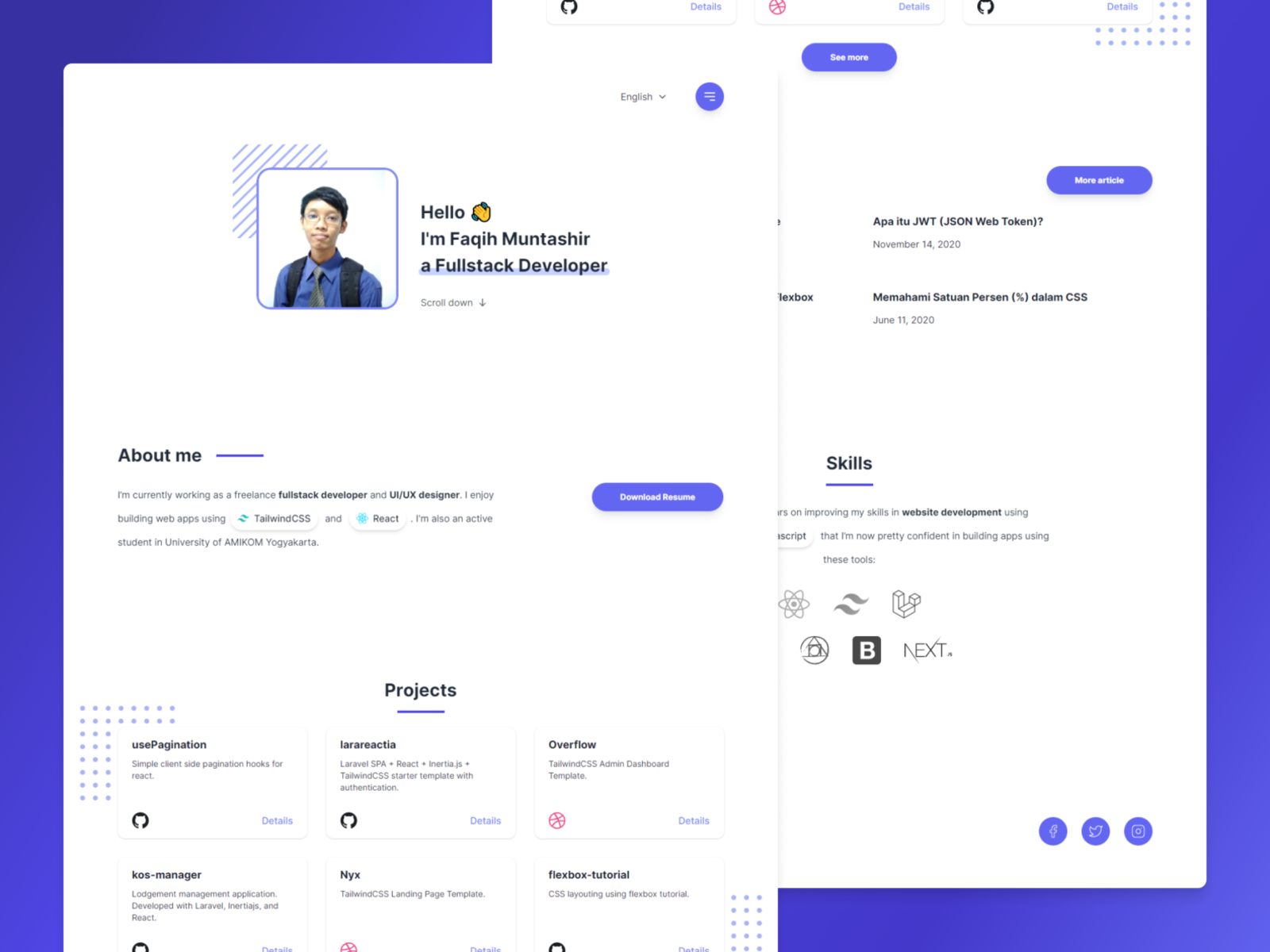
Live Demo
See the template in use at https://fama.itsfaqih.dev/.
Current Stack
- Runtime and package manager: Node.js 24 or newer and Bun 1.4.1
- Application: React 19 with TypeScript 7
- Build tool: Vite 8
- Styling: Tailwind CSS 4 with the
@tailwindcss/viteplugin - UI primitives: Base UI
- Animation: Motion
- Class utilities:
cn - Code quality: Oxlint and Oxfmt
The project uses Tailwind CSS 4's CSS-first configuration in
src/assets/css/styles.css. It no longer requires Create React App, PostCSS,
Autoprefixer, or a separate Tailwind configuration file.
Requirements
- Node.js 24 or newer
- Bun 1.4.1 or newer
The required Node.js version is recorded in .node-version, and the package
manager is declared in package.json.
Getting Started
Install dependencies:
bun install
Start the Vite development server:
bun run dev
The app is available at http://localhost:5173/ by default. Vite chooses the next available port if that port is already in use.
Available Scripts
| Command | Description |
|---|---|
bun run dev | Start the Vite development server. |
bun run start | Alias for the Vite development server. |
bun run build | Create the production build in dist/. |
bun run preview | Serve the production build locally. |
bun run typecheck | Run TypeScript without emitting files. |
bun run lint | Check the project with Oxlint. |
bun run lint:fix | Apply Oxlint's automatic fixes. |
bun run format | Format supported files with Oxfmt. |
bun run format:check | Verify that files are formatted with Oxfmt. |
The repository intentionally has no test script. The former Create React App and Jest scaffolding was removed because the project did not contain a meaningful test suite. Use the typecheck, lint, format, and production-build commands above for the configured project checks.
UI and Navigation
The portfolio includes:
- English and Indonesian language selection.
- Responsive navigation with animated menu transitions.
- Section anchors for
#about,#projects,#blogs,#skills, and#contact. - Animated hero, section, project, blog, and skills content.
- Project and blog links to the existing external destinations.
Project Structure
index.html- Vite application entry document.src/index.tsx- React application bootstrap.src/pages/Home- Home page composition.src/components- Reusable atoms, molecules, organisms, templates, and animations.src/data- Portfolio content and skills data.src/localization- English and Indonesian text.src/assets/css/styles.css- Tailwind CSS 4 entry stylesheet and custom utilities.vite.config.ts- Vite, React, and Tailwind plugin configuration..oxlintrc.json- Oxlint configuration..oxfmtrc.json- Oxfmt configuration.
Production Preview
Build and preview the production output with:
bun run build
bun run preview
The generated static assets are written to dist/.
Cloudflare Pages
Fama is configured as a static Cloudflare Pages project, not a Worker. The
repository-level configuration lives in wrangler.toml:
- Project name:
fama - Build command (Git integration):
bun install --frozen-lockfile && bun run build - Build output directory:
dist - Production branch:
main - Node.js: 24, selected by
.node-version
The Git build command installs the locked dependencies before invoking Vite;
Cloudflare provides Bun in the build image but does not provide this
repository's node_modules directory.
After authenticating Wrangler and creating the Pages project once, a direct production upload can be made with:
npx wrangler pages project create fama --production-branch main
npx wrangler pages deploy --branch main
If the fama Pages project already exists, skip the project create command.
The custom domain fama.itsfaqih.dev must be assigned to the Pages project in
Cloudflare after the first project is created.
[INFO] 2 topics link to curated motion topic pages.